 HabitStack
Barcode scanner
Scan packaged food with your phone camera and the nutrition is filled in from the Open Food Facts database.
Calorie counter
Log breakfast, lunch, dinner, snacks and drinks in seconds, scan a barcode to fill in nutrition automatically, and see how much you have left for the day against your own targets.
Free to use. Works in your browser and installs to your home screen.
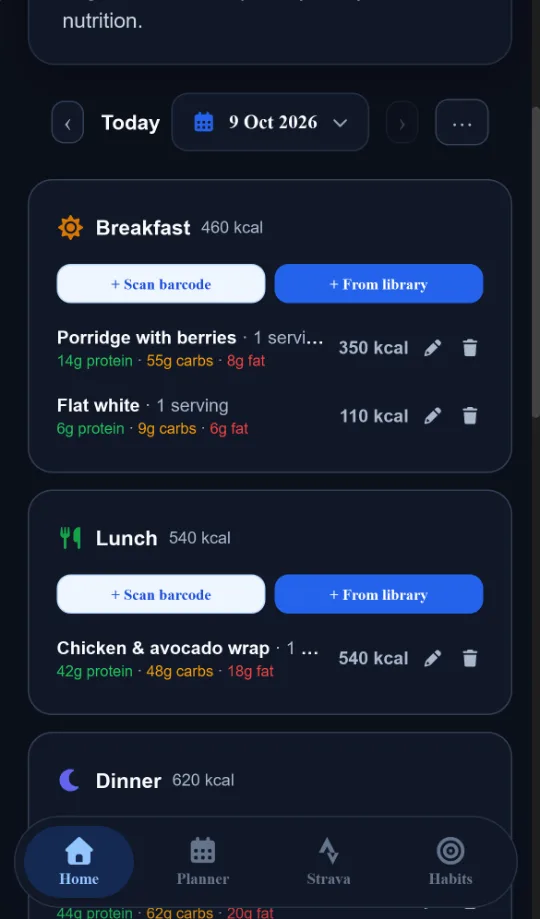
Most foods take one or two taps to log, and the ones you eat often are saved for next time.
Scan packaged food with your phone camera and the nutrition is filled in from the Open Food Facts database.
Track protein, carbs and fat as well as calories, with optional targets per weekday for training and rest days.
Build a recipe once and its calories and macros per serving are worked out for you, then log it in one tap.
Log water with quick-add amounts or a custom amount, and keep drinks separate from your meals.
Log your weight and see the trend over time next to your calorie intake.
Browse any past day, and see daily averages for calories and protein over the period you choose.
Use the free TDEE calculator to estimate how many calories you burn each day and what to eat to lose, maintain or gain weight. Then the macro calculator splits that into protein, carbs and fat. HabitStack uses the same method inside the app, so you can set your targets from your own body stats once you sign up.
Yes. You can log food, scan barcodes, set calorie and macro targets and track your weight for free, with no adverts.
Yes. Scan a barcode with your phone camera and the nutrition is looked up in the Open Food Facts database. You can check and edit it before saving.
Yes. Set daily targets for protein, carbs and fat, and see how much of each you have left as you log.
Yes. You can set targets per weekday, for example more carbs on training days and fewer on rest days.
No. HabitStack runs in your web browser and can be added to your home screen, where it opens like a native app.
Create a free account, set your targets and log your first meal in a couple of minutes.
Create your free account